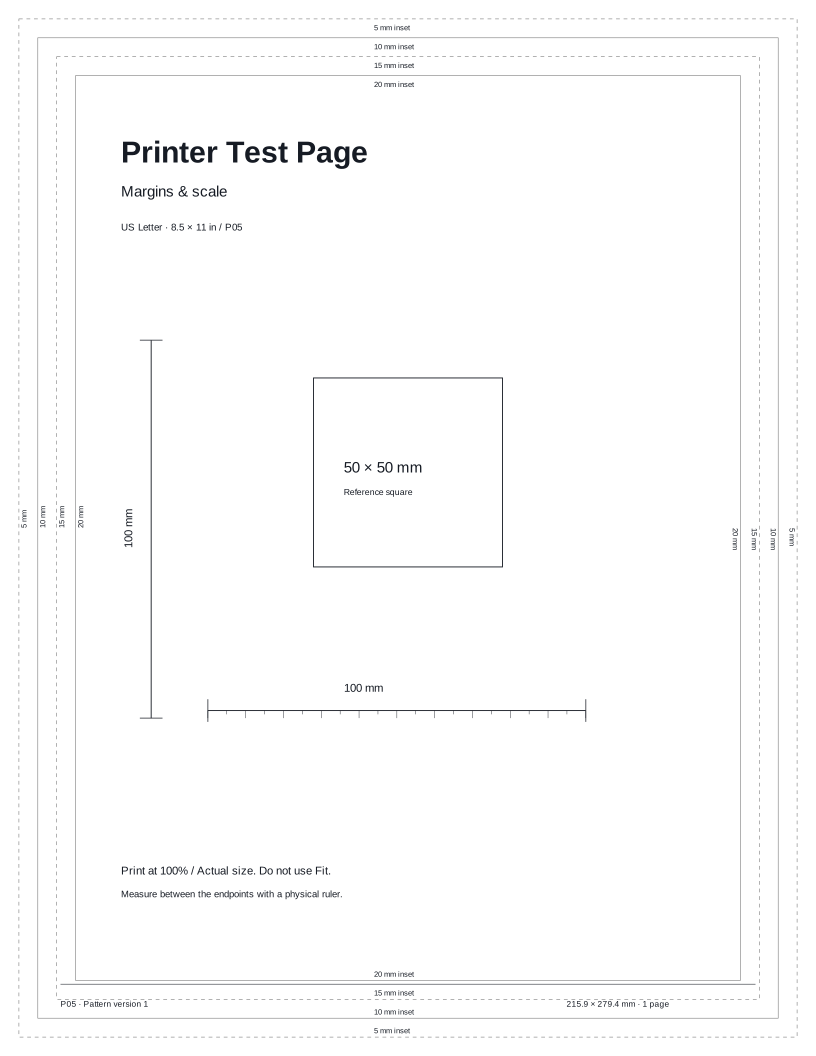
Inset borders
Check which labeled borders remain visible. Outer guides may fall outside the printable area.
 Printer Test PageFree test pages for your printer.TEST PAGE
Check page position, cropped edges, and reference lengths. Measure the printed sheet with a ruler. A quick, easy way to compare your printer’s output.
Preparing your test page…
Use this guide to check the key areas on the test page. Each element helps you inspect a different aspect of print quality.
Check which labeled borders remain visible. Outer guides may fall outside the printable area.

Measure the 100 mm horizontal reference with a ruler.
Measure the vertical reference separately at 100% or Actual size.
Compare the border positions. This checks page geometry, not printhead alignment.
Compare these illustrative examples with your printout. Similar results can have different causes. It can reveal visible output issues, but this sheet cannot diagnose a component or replace your model’s maintenance procedures.
Compare visible borders and measure both 100 mm references.

Outer guides are missing or one side is clipped.
Check paper size and the printer’s printable area. Some outer borders may be outside it.

A printed reference does not measure 100 mm.
Match paper sizes and select 100% or Actual size. Fit settings can resize the document.
Try these other tests for a more complete check.
Here are answers to common questions about the Margins & scale test page.
Print this test page and take a closer look at your output.
Test page not ready. Cancel printing, wait for the selected preview, and try again or download the matching PDF.